

VRidge 2.7.14
VRidge by RiftCat is a PC VR streaming solution that turns your phone into a SteamVR-compatible headset using a cheap mobile viewer like Google Cardboard. The latest version 2.7.14 (May 2026) fixes crashes and improves Android compatibility. It requires a VR-capable PC, a phone with a gyroscope (Android 5.0+ or iOS 12.1+), a controller, and a 5 GHz Wi-Fi network for playable latency (17–33 ms). The full version costs $7.99 on Steam, with a GameWarp addon ($10-12 extra) for playing non-VR games. Performance depends entirely on network quality, weak Wi-Fi means artifacts and input lag. It's not a replacement for a real headset, but for under $20, it's the cheapest way to experience PC VR gaming.
- Free
- Windows
- Nov 8, 2026
c920ff23f6625dee17315d9ba4ee76e64ceee311bd878b2c8345e6c9ea71153fVirusTotal report ↗Screenshots
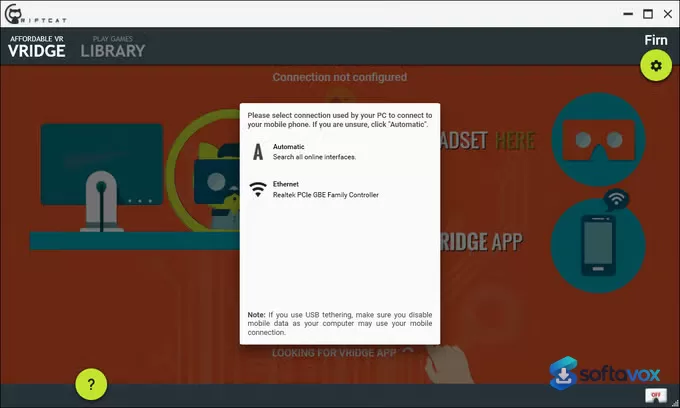
About VRidge
RiftCat VRidge Download, Stream PC VR Games to Your Mobile Headset
TL;DR Quick Take / Who is this for?
RiftCat VRidge is a software bridge that lets you play PC-based virtual reality games on a mobile phone inside a cheap headset like Google Cardboard. It works by streaming the rendered PC VR image to your phone over Wi-Fi or a USB cable while sending your phone’s head-tracking data back to the PC[reference:0]. The appeal is purely economic: for a one-time fee of around $15, you can experience PC VR titles without buying an Oculus Rift or HTC Vive[reference:1][reference:2]. The trial is free but limits sessions to about 10 minutes before you need to purchase the unlimited license[reference:3]. The trade-offs are significant. Performance is heavily dependent on your network quality, a weak Wi-Fi connection introduces compression artifacts, lag, and black screens[reference:4][reference:5]. The software supports rotational head tracking only, meaning you cannot lean or move your head positionally without third-party add-ons[reference:6]. Controller support is also limited, with many games requiring an Xbox controller to function properly[reference:7]. RiftCat VRidge is the right pick for budget-conscious users, tinkerers, and anyone curious about PC VR who already owns a capable PC and a phone. It is not the best choice for users who want a polished, plug-and-play experience, reliable motion controls, or consistent performance without network tuning.
Quick Info Box
| License Type | Shareware (free trial with ~10-minute session limit; full unlimited license ~$15 one-time) |
|---|---|
| File Size | Approx. 10.5 MB (PC client); mobile app size varies by platform |
| OS Compatibility | Windows 8.1/10/11 (PC client); Android 5.0+ and iOS 12.1+ (mobile) |
| Latest Version | Mobile app 2.7.14 (May 2026); PC client updates via Steam |
| Developer | RiftCat Sp. z o.o. (Poland) |
Key Features & Real-World Usability
RiftCat VRidge’s core function is straightforward: it simulates a PC VR headset on your phone. The desktop client installs on your Windows PC and connects to the mobile app, which runs inside your phone. Once connected, SteamVR recognises the setup as a VR headset, and you can launch any compatible game. The recommended connection method is USB tethering for stability, though Wi-Fi works if you have a clean 5 GHz network and a wired PC connection[reference:8][reference:9]. Latency is usually around 50 ms under normal conditions, and head rotation prediction helps keep the experience responsive[reference:10]. The game compatibility list is genuinely impressive for the price. Cockpit and seated games work best: Microsoft Flight Simulator, Elite Dangerous, Project Cars 3, Euro Truck Simulator 2, Assetto Corsa, and War Thunder are all playable[reference:11]. Minecraft with the Vivecraft mod is a popular choice, and Skyrim VR is also supported[reference:12]. For non-VR games, the optional GameWarp add-on creates a cinematic, screen-in-VR view, though it is not true stereoscopic VR without additional tools like ReShade[reference:13][reference:14]. The limitations are where the budget approach shows. Setup involves multiple steps: installing the PC client, installing the mobile app, configuring SteamVR, and running Room Setup[reference:15]. Controller support is inconsistent, and the software does not track positional movement, so you cannot physically duck or lean in the virtual world without external hardware[reference:16]. Visual quality is also constrained by the phone’s screen resolution and the video encoding, with users reporting noticeable color banding and lost detail[reference:17].
- PC VR streaming to mobile: Simulates an Oculus Rift or HTC Vive on your phone, letting you play SteamVR games on a Google Cardboard, Gear VR, or Oculus Quest headset[reference:18][reference:19].
- One-time $15 license: The full unlimited version is a single purchase, with no subscription, making it one of the cheapest entry points into PC VR[reference:20].
- Wi-Fi and USB connection: Supports both wireless streaming and USB tethering, with USB offering the most stable and lowest-latency experience[reference:21].
- Broad seated-game compatibility: Works well with cockpit and driving games, flight simulators, and hybrid-control titles like Minecraft with Vivecraft[reference:22].
- GameWarp add-on for non-VR games: Creates a virtual screen inside your headset for playing flat-screen games, with optional ReShade integration for depth effects[reference:23][reference:24].
- Low latency under good conditions: Latency is typically around 50 ms, with prediction and reprojection techniques improving responsiveness for head rotations[reference:25].
- Free trial: The mobile app is free to download and test, with sessions limited to roughly 10 minutes before requiring the paid license[reference:26].
Pros, Cons & Community/User Feedback
User sentiment around RiftCat VRidge is mixed, and the split maps closely to how well the user’s network and expectations align with the software’s limitations. On Google Play, the app has over 1.9 thousand reviews, and the feedback is polarised. One user describes it as a “poor man’s version of VR” with “low frame rate and encoding problems” over Wi-Fi, while another calls it “the cheapest way to get a VR setup running” and praises the easy setup once the connection works[reference:27][reference:28]. On Steam, the all-review score sits at “Mixed,” with 66% of 56 user reviews positive in one region and 60% of 74 positive in another[reference:29]. Viveport shows a 3.9 out of 5 from 20 reviews, with 55% five-star ratings but a notable 20% one-star cluster[reference:30]. The positive reviews consistently highlight the value proposition and the “surprisingly immersive experience for the cost” when everything lines up[reference:31]. Users who enjoy cockpit games and are willing to use a wired connection often report good results, and the developers are described as helpful and friendly[reference:32]. The complaints are equally consistent and fall into three categories. First, connectivity and stability: frequent black screens on startup or during gameplay, disconnections after short periods, and performance that degrades with weak Wi-Fi[reference:33][reference:34]. Second, controller and input issues: poor controller support, complicated setup processes, and a requirement for an Xbox controller for many games, which frustrates users expecting seamless motion controls[reference:35][reference:36]. Third, visual quality: low clarity, obvious color banding, and lost detail on the phone screen, with some users finding the resolution insufficient for comfortable play[reference:37]. One Steam reviewer summarised a common experience: the app worked “perfectly for exactly one day after purchase” and then began to malfunction[reference:38]. The practical takeaway is that VRidge delivers a genuinely functional PC VR experience for a fraction of the cost of a dedicated headset, but it is a tinkerer’s tool, not a consumer appliance. Users who treat it as a budget experiment and are prepared to troubleshoot will get value; users who expect plug-and-play reliability will be disappointed.
Pros
- Extremely low entry cost: ~$15 one-time for unlimited PC VR streaming
- Works with cheap Google Cardboard, Gear VR, and Oculus Quest headsets
- Broad compatibility with seated and cockpit-style SteamVR games
- USB tethering option provides stable, low-latency performance
- GameWarp add-on extends functionality to non-VR flat-screen games
- Free trial lets you test performance on your own network before buying
- Helpful developer support reported by some users
Cons
- Heavily dependent on network quality; weak Wi-Fi causes lag, artifacts, and black screens
- Only rotational head tracking, no positional movement without third-party hardware
- Controller support is inconsistent, and many games require an Xbox controller
- Visual quality is limited by phone screen resolution and video compression
- Setup is multi-step and can be frustrating for non-technical users
- Stability issues reported, including disconnections and app malfunction after initial use
- Mixed Steam review scores (60–66% positive) reflect inconsistent experiences
Final Verdict & Safe Download Advice
RiftCat VRidge is a niche tool with a clear value proposition: it lets you experience PC VR for the price of a cheap headset and a $15 license. If you already own a gaming PC, a phone, and a Cardboard-style viewer, and you are willing to spend an evening configuring SteamVR and experimenting with connection methods, VRidge can deliver genuinely enjoyable sessions in cockpit games, flight simulators, and hybrid-control titles. The latency is low enough to be usable under good conditions, and the game compatibility list covers many of the best seated VR experiences available. The caveats are not minor. The software is not polished, the setup is not simple, and the experience degrades quickly if your network is not solid. The lack of positional tracking is a fundamental limitation that no amount of configuration can fix, and controller support remains a weak point. If you want a reliable, comfortable VR experience with full motion controls, a dedicated headset is the only answer. If you want to explore PC VR on a tight budget and you enjoy tinkering, VRidge is the most established option in its category, and the free trial makes it easy to test before committing. Download the trial, use a USB cable, and try a seated game first. If it works for your setup, the $15 license is a reasonable investment in a niche but capable tool.
- Download only from riftcat.com or the official Steam store page: The PC client is distributed through Steam, and the mobile app comes from Google Play or the Apple App Store. Third-party “VRidge free download” sites may repackage the installer with unwanted software or outdated builds.
- Verify the installer size and version: The PC client is approximately 10.5 MB, and the current mobile app version is 2.7.14. A dramatically larger file or an installer claiming to be a newer version from an unofficial source is a warning sign.
- Check system requirements before installing: The PC client requires Windows 8.1 or later, an Intel i5-2500 equivalent or better, 4 GB of RAM, and a GPU capable of running VR games. The mobile app requires Android 5.0+ or iOS 12.1+ with a gyroscope.
- Use the free trial to test your network: The trial limits sessions to about 10 minutes, which is enough to confirm whether your Wi-Fi or USB connection delivers acceptable performance. If the trial stutters or blacks out, the paid version will not fix the underlying network issue.
- Prefer USB tethering over Wi-Fi: The developer recommends USB tethering for the most stable experience. Enable it in your phone’s hotspot settings and disable mobile data to prevent your PC from using your phone’s internet connection[reference:39].
- Do not use “cracked” or “pre-activated” versions: VRidge is a paid product with a free trial. Cracked installers are a malware vector, and the official trial already lets you evaluate the full functionality.
See all Leisure programs (1) ›
Key features
- PC VR streaming to mobile, simulates an Oculus Rift/HTC Vive on your phone; play SteamVR games in a cheap Cardboard/Gear VR/Quest headset
- One-time ~$15 license, unlimited use; no subscription
- Wi-Fi and USB connection, USB tethering recommended for lowest latency and stability
- Broad seated/cockpit game compatibility, works well with flight sims, driving games, and titles like Elite Dangerous, Project Cars 3, Euro Truck Simulator 2, Assetto Corsa, War Thunder, and Minecraft with Vivecraft
- GameWarp add-on, creates a virtual screen for non-VR flat-screen games (optional ReShade for depth effects)
- Low latency under good conditions, typically around 50 ms with head-rotation prediction
- Free trial, mobile app free to test; sessions limited to roughly 10 minutes
- PC client size, approx. 10.5 MB; mobile app version 2.7.14 (May 2026)
- Platforms, Windows 8.1/10/11 PC client; Android 5.0+ and iOS 12.1+ mobile
- Rotational head tracking only, no positional movement without third-party add-ons
Frequently asked questions about VRidge
Is VRidge safe to use?
Is VRidge free?
What do I need to run VRidge?
What is VRidge used for?
Why is VRidge laggy or blurry?
How do I uninstall VRidge?
Versions
| Version | Release date | Platform | File size | |
|---|---|---|---|---|
| VRidge 2.7.14 Latest version | Aug 17, 2024 | Windows | 5.2 MB | Download |
Comments about VRidge
No comments yet. Share your experience with this program!